
Business Central and Power Apps
What Integration Actually Delivers
You’re running Business Central for your core operations—accounting, inventory, sales, and service. It handles the fundamentals well. But when you need custom workflows, specialized reporting, or automation that doesn’t exist in standard Business Central, you’ve got three options: live with manual processes, pay for expensive custom development, or build it yourself with Power Apps.
Most mid-market companies don’t realize that last option exists, or what it means for how quickly you can solve operational problems.
What Power Apps actually is (without the Microsoft marketing speak)
Power Apps is Microsoft’s low-code development platform—meaning you can build custom applications without needing a full development team. It’s not “no-code” (that’s marketing exaggeration), but it dramatically reduces the technical skill required to create functional business applications.
Think of it as the difference between building with LEGO blocks versus machining custom parts from raw materials. The fundamental components already exist; you’re assembling them in ways that solve your specific problems.
What you can build with Power Apps:
- Custom data entry forms that match your exact workflows
- Mobile apps that give field staff real-time access to Business Central data
- Approval workflows that route requests through your specific chain of command
- Dashboards that combine Business Central data with information from other systems
- Automated processes that trigger based on Business Central events
The reason this matters for Business Central users specifically: Power Apps connects natively to your Business Central data without complex integration work. You’re not exporting, transforming, and loading data—you’re working with the same database that powers your ERP.
The practical scenarios where this actually helps
Abstract capabilities don’t mean much until you see how they apply to your actual business. Here’s what Power Apps integration looks like in practice:
Your field technicians need equipment history without calling the office
Standard Business Central isn’t designed for technicians working from a truck. They’d need VPN access, full Business Central licenses, and training on navigation—all impractical for someone whose job is fixing equipment, not data entry.
With Power Apps, you build a mobile app that shows exactly what technicians need: service history for the serial number they’re standing in front of, parts inventory at nearby branches, customer contact information, and a simple form to record what they did. It reads from and writes to Business Central, but the interface is designed for their specific workflow.
This isn’t theoretical—it’s a common implementation pattern. The technician gets the information they need in seconds. Your service records stay current without administrative staff chasing down handwritten notes. The work order automatically updates when they’re done.
Your rental coordinators need information that spans multiple Business Central modules
When a customer calls about extending a rental contract, your coordinator needs to see: current rentals, payment history, outstanding invoices, service records on those units, and available inventory. Standard Business Central requires opening multiple pages and mentally connecting the information.
A Power Apps dashboard puts it on one screen—customer name at the top, all the relevant information organized by category, and buttons to perform common actions like extending contracts or creating service work orders. Same data, different presentation layer optimized for how rental coordinators actually work.
Your managers need operational insights that Business Central reports don’t provide
Business Central’s standard reports are designed for accounting and compliance. They answer financial questions well. They’re less useful for operational questions like “Which customers generate the most service calls?” or “Which equipment types have the highest utilization rates?” or “How does our pipeline look across all sales reps this month?”
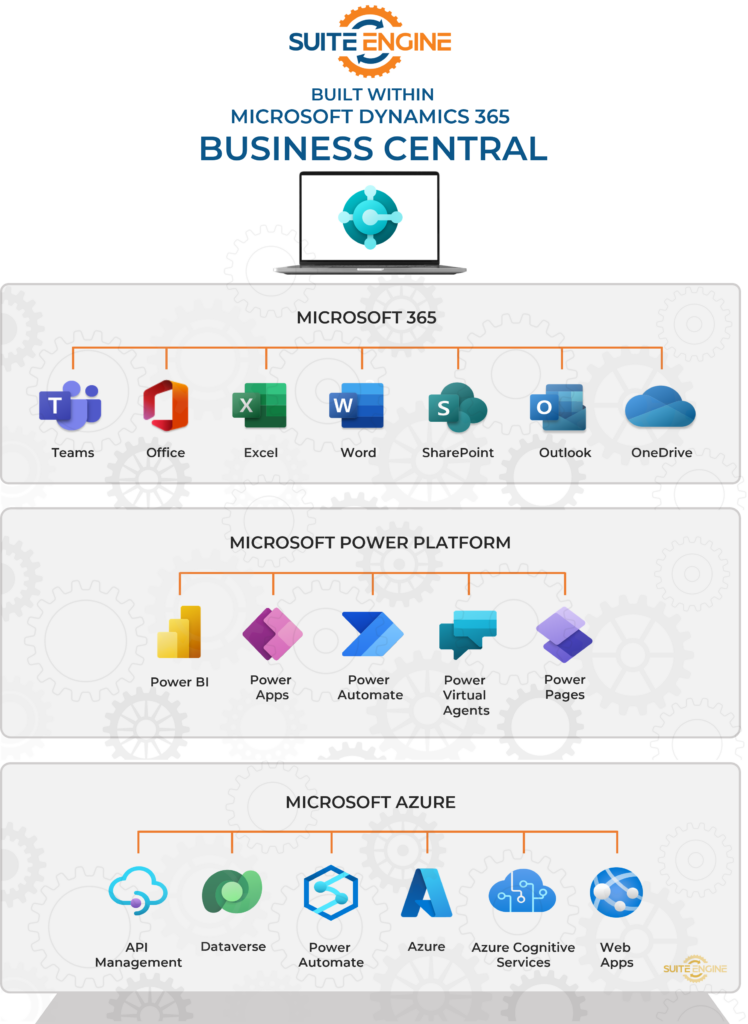
Power BI (which is part of the Power Platform alongside Power Apps) lets you build exactly those reports. You connect to Business Central data, add data from your CRM if you want, create visualizations that show operational patterns, and publish them where managers check them regularly.
The advantage over custom report development: you can iterate quickly. If a report isn’t showing what you need, you adjust it yourself rather than submitting a change request to a developer.
Your approval workflows don’t match Business Central’s standard processes
Every business has specific rules about who approves what. Purchase orders over certain amounts need different approval chains. Service work exceeding estimated hours requires sign-off. Rental rate adjustments need management approval.
Business Central has approval workflows, but they’re rigid—designed for common scenarios, not your specific rules. Power Automate (also part of Power Platform) lets you build the exact approval logic your business uses, with emails, Teams notifications, mobile approvals, and escalations when requests sit too long.
When someone submits something requiring approval in Business Central, Power Automate routes it through your specific chain, keeps everyone informed, and posts the final approval back to Business Central automatically.
Why “already integrated” actually matters
The technical integration between Business Central and Power Platform isn’t just a convenience—it changes what’s practical to build.
Without native integration, connecting custom applications to your ERP means:
- Authentication headaches (how do users log in securely?)
- API complexity (which endpoints exist, what parameters do they expect?)
- Data mapping (translating between systems that use different field names and structures)
- Security concerns (who can access what data through this new channel?)
- Update problems (when Business Central updates, does your integration break?)
All of these are solvable, but they require specialized technical expertise and ongoing maintenance. For most mid-market companies, this means custom development projects that cost tens of thousands of dollars and take months.
With native integration, you get:
- Same authentication as Business Central (Azure AD)
- Pre-built connectors that understand Business Central’s data structure
- Automatic field mapping
- Security inherited from Business Central permissions
- Updates handled by Microsoft—your Power Apps keep working when Business Central updates
This dramatically reduces both initial development cost and ongoing maintenance burden. What would be a six-month custom development project becomes something your operations team can prototype in a few weeks.
What this doesn’t mean (setting realistic expectations)
Power Platform integration isn’t a magic solution for every business software need.
It won’t replace your ERP. Business Central handles the core business processes—accounting, inventory, sales, purchasing. Power Apps extends and customizes those processes; it doesn’t replace them. If you’re fundamentally unhappy with Business Central as your ERP, Power Apps won’t fix that.
It requires people who can build things. “Low-code” doesn’t mean “no learning curve.” Someone needs to understand how to design forms, create workflows, and build reports. Many companies train existing staff (often operations people who understand the business but aren’t developers). Some hire specialized talent. Either way, it’s not just clicking a button and getting an app.
It won’t fix unclear processes. If your approval workflows are inconsistent or your data quality is poor, automating them just scales the problem. Power Apps executes the processes you define—it doesn’t create good processes for you.
Custom-built apps require maintenance. Unlike packaged software that’s maintained by a vendor, apps you build with Power Apps are your responsibility. When business requirements change, someone needs to update the apps. When new staff join, someone needs to train them. Budget time and resources accordingly.
Complex integrations still need developers. Power Platform handles common Business Central scenarios well. If you need to integrate with legacy systems, perform complex data transformations, or build applications that thousands of users will access simultaneously, you still need professional developers.
Making it work: what successful implementations look like
Companies that get value from Power Platform integration typically follow a pattern:
Start with a specific problem, not a platform exploration. Don’t implement Power Apps because it exists. Identify a concrete operational pain point—technicians making extra trips, managers lacking visibility, approval bottlenecks—and build something that solves it. Learn from that first project, then tackle the next problem.
Involve the people who actually do the work. Your best app designers aren’t your IT department—they’re the operations staff who understand what information they need and when they need it. Train them on Power Apps basics, support them with IT expertise, but let them drive the design.
Keep initial projects simple. Your first Power App should take weeks, not months. One screen, one workflow, clear success criteria. Learn how the platform works, what your team’s capabilities are, and what users actually adopt. Then build something more sophisticated.
Plan for ongoing maintenance. Apps don’t stay relevant automatically. As your business changes, the apps need to change too. Someone needs to own this—either dedicating staff time or budgeting for ongoing contractor support.
Document what you build. When the person who built an app leaves or moves to another role, someone else needs to understand how it works. Basic documentation during development saves significant trouble later.
Where Power Platform fits in your overall technology strategy
The Business Central + Power Platform combination addresses a specific gap in most mid-market technology stacks: the need for custom applications that fit your exact workflows without the cost and complexity of traditional custom development.
It works best when:
- You’ve got Business Central as your ERP foundation
- You need specific capabilities that packaged software doesn’t provide
- You can dedicate resources to building and maintaining custom solutions
- Your operational staff are willing to learn new tools
- You need flexibility to adjust as business requirements change
It works poorly when:
- You want packaged solutions with vendor support
- You lack internal resources to build and maintain apps
- You need enterprise-scale applications serving thousands of users
- You’re still figuring out basic processes
The right question isn’t “Should we use Power Apps?” but rather “Do we have specific operational needs that custom applications would solve more effectively than our current approach?”
Evaluating whether this approach makes sense for you
Before investing in Power Platform capabilities, consider:
Do you have recurring manual processes that take significant time? If your staff spends hours each week on data entry, status updates, or information gathering, those are often good candidates for automation through Power Apps and Power Automate.
Do your managers complain about lack of visibility? If the information exists in Business Central but isn’t in a format decision-makers can actually use, Power BI reports might provide the insight they need.
Do your field staff need real-time access to information? If technicians, sales reps, or delivery drivers frequently call the office for information that exists in your ERP, mobile apps built with Power Apps can make them more productive.
Are you comfortable investing in building capabilities rather than buying solutions? Power Platform requires ongoing effort—it’s not a one-time purchase. Make sure that matches your organization’s approach to technology.
Do you have staff who can learn new technical skills? Not everyone can or wants to build applications. Identify who on your team has both the aptitude and interest before committing.
The bottom line
The Business Central and Power Platform integration matters because it makes custom applications practical for mid-market companies. What previously required expensive custom development or acceptance of manual workarounds becomes something your own staff can build, maintain, and adjust as needs change.
But like any capability, it’s valuable when applied to the right problems and frustrating when forced onto situations where packaged solutions would work better. The companies getting the most value start small, solve specific operational pain points, and build from there—not because they’re implementing Power Apps as a strategy, but because they’re solving real business problems with tools that happen to make that practical.
Want to see how other companies apply Business Central and Power Platform together? Explore our resources or schedule a conversation about specific operational challenges you’re facing. We work with equipment dealers, residential builders, and eCommerce businesses who’ve all found different ways to extend Business Central for their particular needs.
SUITE ENGINE | We connect your business with modern software from Microsoft.
Simplified processes. All in one place.
Related Articles:
- Outgrowing Your Accounting Software?
- Protect Your DMS Data
- Business in the Cloud
- BC SaaS Advanced Security Features
- AI in Business Central
- Building for Tomorrow’s Boom
- What An eCommerce Business Really Gains from ERP Integration
- Before the Demo: Your Essential DMS Evaluation Guide
- 10 Things About RPM You Must Know
- Find Your Perfect Partner Match





