
Managing Equipment Rentals in Business Central –
What Actually Works –
You chose Microsoft Dynamics 365 Business Central because it’s a solid ERP. It handles your financials, manages your purchasing, and tracks your inventory. But when you try to manage equipment rentals? You hit a wall.
Standard Business Central treats your bulldozers like widgets in a warehouse. There’s no rental contract management. No utilization tracking. No meter-based maintenance scheduling. Your excavators generate revenue three different ways: rentals, sales, and service, but BC sees them as simple inventory items with a quantity on hand.
If you’re running an equipment dealership or rental operation, you’ve probably already discovered this gap. Here’s why standard Business Central struggles with equipment rentals—and what actually works.
Why Standard Business Central Falls Short for Equipment Rentals
First, let’s be clear about what’s not working. Business Central wasn’t designed with equipment rentals in mind. You can sell products. You can track inventory. But rental operations need something fundamentally different.
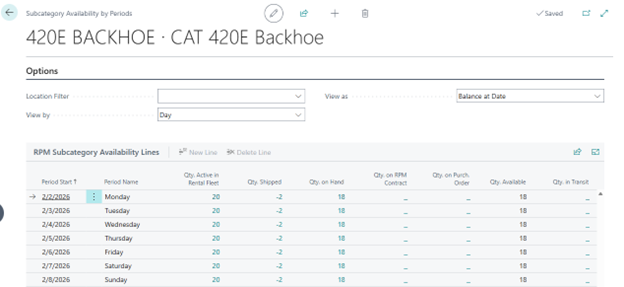
 Here’s what breaks down: You can’t track rental availability across date ranges. BC’s inventory system knows if you have five forklifts in stock, but it can’t tell you which ones are available next Tuesday through Friday. When a customer calls asking if you have a compact excavator available for three weeks starting the 15th, you’re checking spreadsheets or your memory—not your ERP.
Rental billing doesn’t fit BC’s standard sales invoice model. You need daily rates, weekly rates, and monthly rates. Minimum rental periods. Damage waivers. Delivery charges. Rate adjustments based on rental duration. Standard BC invoicing expects you to sell Item A for Price B. That’s not how equipment rental works.
Your equipment isn’t just inventory—it’s revenue-generating assets with complex lifecycles. That skid steer you bought last year has been rented 47 times, serviced twice, and you need to know if it’s profitable enough to buy three more. BC’s inventory costing tells you what you paid for it. It doesn’t tell you if it’s making you money.
Your Three Real Options for Managing Equipment Rentals in Business Central
Let’s be practical. You’ve already invested in Business Central, and you’re not ripping it out. You need a way to manage rentals that actually works. Here are your realistic options.
Option 1: Use Standard Business Central Inventory Management
This is the “let’s try to make it work” approach. You’ll use sales orders for rental contracts, negative inventory adjustments for equipment out on rent, and lots of spreadsheets to track what’s actually happening. Your data lives in multiple places. You can’t see real-time availability. When someone asks, ‘What’s our utilization rate on compact excavators?’ you’re pulling data from three sources and hoping your formulas are right.
When this might work: If you have fewer than 10 rental units, simple daily rates, and customers who rarely extend rentals, you might survive with this approach. But you’re not optimizing your business—you’re just keeping your head above water.
Option 2: Build Custom Rental Functionality in Business Central
You could hire developers to build rental management directly into Business Central. Create custom tables for rental contracts. Build rental availability calculations. Design meter reading tracking. Integrate everything with standard BC financials.
The reality of custom development: You’re looking at six to twelve months of development time. Every Business Central update means regression testing to make sure your customizations still work. When your rental process changes—and it will—you’re calling developers and paying for modifications.
This makes sense for massive enterprises with unique rental requirements that no packaged solution addresses. If you’re renting specialized medical equipment with FDA compliance requirements or managing a fleet of mining vehicles with complex contracts, custom development might be justified.
For most equipment dealers? You’re spending $100,000+ to recreate functionality that already exists, and you’re committing to ongoing maintenance costs forever.
Option 3: Use Purpose-Built Rental Management Within Business Central
Instead of fighting against Business Central or rebuilding it, you’re adding equipment-specific functionality that was designed for rental operations.
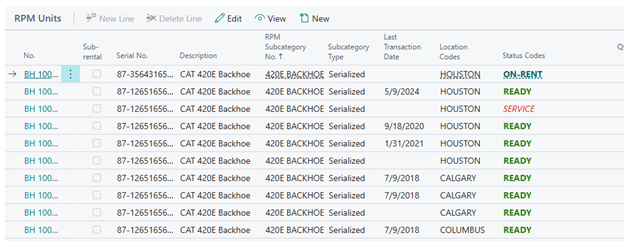
What “purpose-built” means: The system understands that a piece of equipment generates revenue in multiple ways over its lifecycle. Today it’s on-rent. Next month, it comes off rent (Ready) and goes into sales inventory. Six months later, it’s sold, and the customer brings it back for warranty service. All of that flows through one integrated system.
No spreadsheets. No checking three systems.
Rental contracts work the way rental contracts actually work. Daily rates. Weekly rates. Monthly rates. Best rate logic that automatically applies the lowest cost for your customer. Prorated charges when someone brings equipment back early. All of this processes through Business Central’s financial system correctly, so your accounting is accurate without manual journal entries.
Here’s a real example: A construction equipment dealer manages 500+ rental units across three locations.
- They know exactly which equipment is available at which location.
- When a unit comes off rent at Location A, but someone needs it at Location B, the transfer happens in the system.
- Utilization reporting shows them which equipment types are most profitable, so they can make smart purchasing decisions.
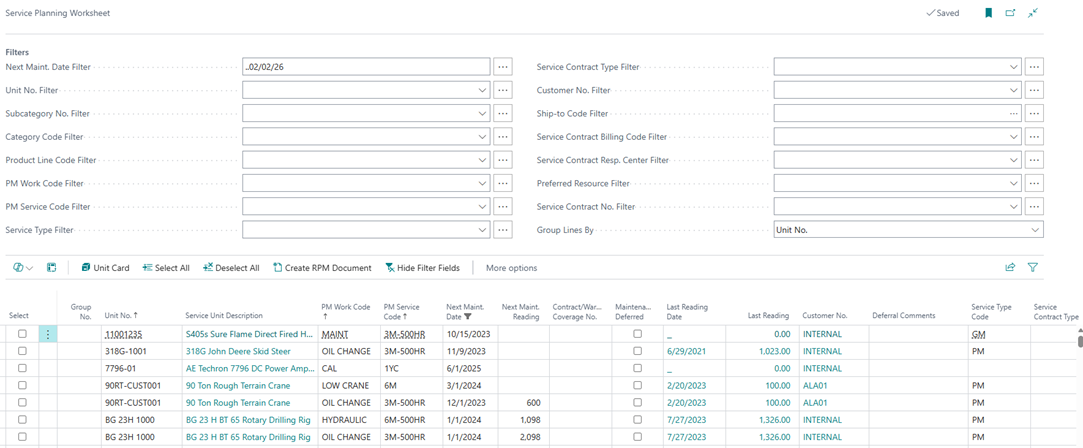
- Service history follows each unit, so they know maintenance costs before deciding whether to sell or keep renting.
The Questions to Ask Before Choosing Your Approach
If you’re evaluating how to manage equipment rentals in Business Central, here are the questions that matter.
Does it show real-time availability across date ranges and locations? You need to answer “Which propane forklift with 5,000-pound capacity is available at our east location?” without checking spreadsheets or calling other branches.
Can it track equipment through its entire lifecycle? From rental inventory to used sales to warranty service—without losing cost history, maintenance records, or revenue tracking. If the system thinks your bulldozer is the same as office supplies, it’s not built for equipment rental.
Does it handle automatic rate optimization? A 12-day rental should apply weekly rates plus daily rates automatically, giving customers the best price without you manually recalculating every invoice.
Can you handle rent-to-own conversions smoothly? Customers change their minds. Something they started renting, they now want to buy. Can your system convert a rental contract to a sale without recreating everything manually?
Does it show you utilization and profitability by individual unit? You need to know which equipment is making money and which is just taking up space in your yard.
How does it handle the complex billing that rental operations require? Daily rates with weekly and monthly discounts. Minimum rental periods. Damage waivers. Environmental fees. Delivery and pickup charges. If you’re manually calculating any of this, you’re wasting time and probably leaving money on the table.
Making Equipment Rental Management Actually Work
Managing equipment rentals in Business Central doesn’t have to mean duct-taping together inventory modules and hoping for the best. You need a system that understands that a forklift isn’t just a SKU—it’s an asset that generates rental revenue, requires usage-based maintenance, moves between locations, and eventually transitions to used equipment sales.
Standard Business Central handles your financials beautifully. But rental operations need equipment-specific functionality built for how you actually work. Whether that’s custom development or purpose-built software depends on your operation’s size, complexity, and how much you value your time versus ongoing customization costs.
The equipment dealers who’ve solved this problem can answer these questions instantly: Which excavators are available February 10-24? What’s our utilization rate by equipment class? Which units need service this week? If you’re still pulling this data from three different places, your rental management isn’t working for you.
You’ve already invested in Business Central for good reasons. Make sure your rental management approach takes advantage of that investment instead of working around it.
Frequently Asked Questions
Can Business Central manage equipment rentals out of the box?
No. Standard Business Central can manage inventory and sales, but it doesn’t handle rental-specific functionality like availability tracking across date ranges, usage-based maintenance, or rental contract billing. You’ll need either custom development or a purpose-built rental management solution integrated with Business Central.
What’s the difference between inventory management and rental management?
Inventory management tracks quantities—how many units you have and their cost. Rental management tracks individual equipment over time, including which specific unit is available when, usage history, maintenance schedules, and profitability by asset. Your rental operation needs to know “Is forklift #157 available next Tuesday?” not just “Do we have forklifts in stock?”
How do equipment dealers track rental utilization in Business Central?
With standard Business Central, most dealers resort to spreadsheets or don’t track utilization at all. Purpose-built rental solutions track every rental period, calculate days rented versus days available, and show utilization rates by equipment type, individual unit, or location. This data drives purchasing decisions and helps identify underperforming equipment.
Do I need to replace Business Central to manage rentals properly?
No. Business Central remains your ERP foundation, handling financials, purchasing, and overall business operations. You’re adding rental-specific functionality that integrates with Business Central rather than replacing it. Your financial data stays in Business Centra,l where it belongs—you’re just extending it with equipment rental capabilities.
Does Business Central Premium include rental management features?
No. While Business Central Premium includes advanced inventory and service management features, it doesn’t include rental-specific functionality like availability calendars, usage-based maintenance triggers, or rental rate calculations. You’ll need to add purpose-built rental management that integrates with Business Central, regardless of the tier you’re using. Your financial data stays in Business Central, where it belongs; you’re just extending it with equipment rental capabilities.
Ready to Experience the Difference? At Suite Engine, we combine cutting-edge Microsoft technology with deep equipment industry expertise to deliver RPM, specifically designed for rental equipment dealerships. Our fully integrated platform eliminates operational silos while providing the scalability and user experience that modern dealerships demand.
Schedule your personalized demo today and discover why industry leaders choose Suite Engine for their DMS solution.
Related Resources:
- Evaluating a DMS: The Complete Integration Guide
- Before the Demo: Your Essential DMS Evaluation Guide
- Successful DMS Implementation: What You Need to Know
- Unified Equipment Dealer Management – RPM
- Protecting Your DMS Data with Integrated Systems
- How to Grow and Scale Your Equipment Dealership
- The Power of Integration
SUITE ENGINE | We connect your business with modern software from Microsoft.
Simplified processes. All in one place.
Equipment Management | Production Builders | and more …





