
All-in-One Construction Management System
Managing a residential construction business means tracking dozens of moving parts at once: vendor contracts, lot budgets, subcontractor schedules, buyer selections, inspections, and financials. When those pieces live in separate systems or spreadsheets, things fall through the cracks. Budgets drift. Subcontractors miss deadlines. Your accounting team spends more time chasing numbers than analyzing them.
An all-in-one construction management system changes that. With everything connected, you gain:
- Automated estimate and contract-based project profitability assessment.
- Instant warning of budget-to-actual costs and payment overruns.
- Access to real-time financial insights anytime, anywhere.
To get those benefits, though, you need a system that’s truly integrated, not a collection of tools held together by manual exports and workarounds.
HomeBuilder | The Power of All-in-One Construction Management
HomeBuilder, powered by Microsoft for Business Central, revolutionizes the day-to-day operations of your construction business. Here’s why HomeBuilder stands out:
1. Streamlined and Integrated Project Management:
Without a phone call, Accounting knows the status of construction tasks, and invoicing can be immediately processed. Any task delays can automatically indicate a new milestone completion date. Related video: Site Super | Key Tasks & Dates
2. Cost Control and Budget Management:
HomeBuilder builds your budget automatically from vendor contracts, so you’re not starting from a blank spreadsheet every time. When a purchase invoice comes in, the system compares it against the approved contract amount before it posts. If a subcontractor bills beyond what was agreed, you know before it hits your books rather than discovering the variance at month-end. That gives your project managers and accounting team a shared view of where each lot stands financially, without anyone having to manually reconcile the two.
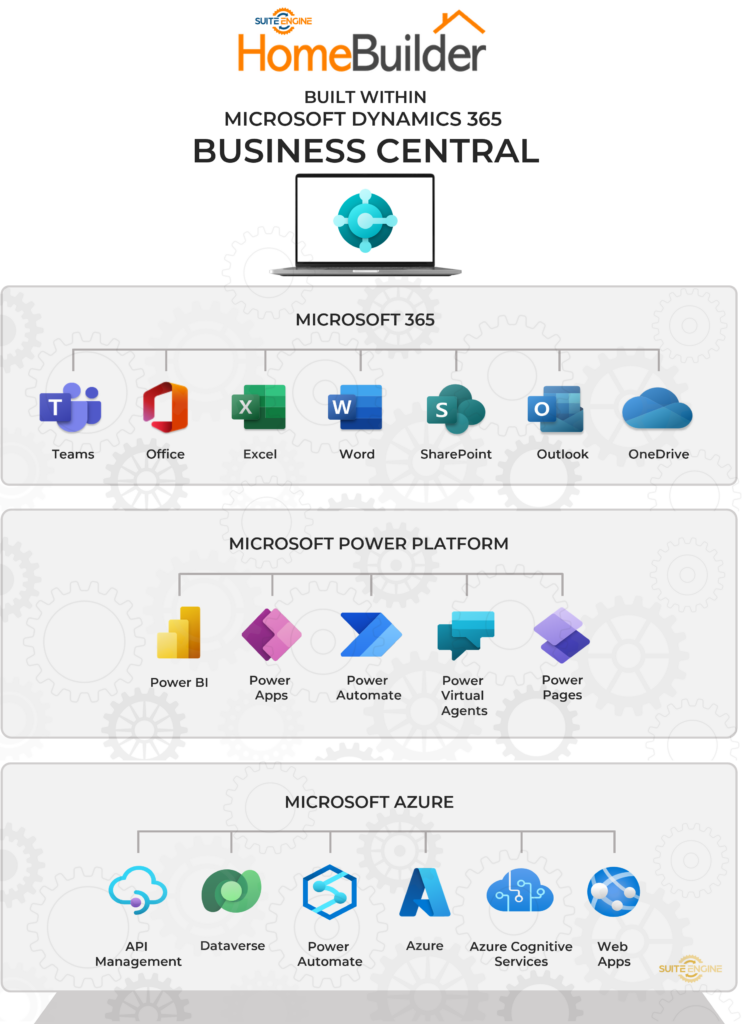
3. Built Within Microsoft Dynamics 365 Business Central:
HomeBuilder is built within Microsoft Dynamics 365 Business Central—No separate accounting software required.
4. Inspections and Deficiencies (Capture and Tracking):
Capture the details of your inspections, including taking ad-hoc or a predetermined list of tasks. Stay mobile by taking photos and creating warranty requests and documentation via tablet or phone. Track through to completion of deficiency or issue resolution. Related Video: How to Conduct an Inspection from a Mobile Device
5. Scalability:
HomeBuilder grows with your business without requiring system changes or custom development. Whether you’re managing two communities or twenty, the structure stays the same: phases, models, lots, budgets, and buyers all organized the way a production builder actually works. There are no limits on legal entities or phases, so as you enter new markets or add communities, your operations scale within the same system you already know.
6. Document and Data Management:
Organized documents and data management are crucial in construction projects. HomeBuilder centralizes documents, drawings, contracts, and critical project information, making them easily accessible and searchable for your team. In addition, HomeBuilder allows your vendors/subcontractors to access their documents through a secure portal.
7. Collaboration and Communication:
Connectivity is critical to clear collaboration and communication among project teams, subcontractors, and clients. HomeBuilder enables progress updates, notifications, and transparent communication throughout the project lifecycle.
8. Reporting and Analytics:
Leverage PowerBI to generate insightful reports and analytics, access critical data to make informed decisions, identify trends, and enhance project performance.
Why Purpose-Built Matters for Production Builders
Generic construction management tools and standalone accounting systems weren’t designed for production residential builders. They can track tasks or manage finances, but rarely both, and almost never in a way that reflects how a builder actually operates: by lot, by phase, by community, with buyers, vendors, and trades all moving at once.
HomeBuilder is built within Dynamics 365 Business Central, which means your construction operations and your financials run in the same system. When a task completes, a milestone updates. When a vendor invoice posts, your budget reflects it. Your accounting team sees the same numbers your project managers do, because they’re working in the same place.
That’s the difference between software that’s connected and software that’s integrated.
“We are overall happy with the software functionalities, implementation and most importantly their development team listens to what the customer has to say about the product and is constantly enhancing the functionalities and user friendliness of the software.”
~ Albert Chen | VP Accounting, Fernbrook Homes
“We converted from NAV to HomeBuilder a year ago and the software is working exactly as expected. It balanced to the penny.”
~ Julie Hoffman | Controller, Previn Court Homes
If any of this sounds familiar, it’s worth seeing HomeBuilder in your context. Schedule a personalized demo, and we’ll walk through the specific scenarios that matter most to your business.
SUITE ENGINE | We connect your business with modern software from Microsoft.
Simplified processes. All in one place.
Home Builders | Equipment Rental | and more …
Learn More About HomeBuilder
Get the App on Microsoft AppSource today, or request a personalized demo here!





